



Screens have become essential for work, learning, shopping, entertainment, and staying connected. Yet long hours on phones, laptops, and tablets can leave eyes feeling dry, tired, blurry, or sore. This discomfort is often called digital eye strain or screen fatigue.
Small, practical habits can make a noticeable difference without requiring a complete break from modern life. Think of eye care as an ongoing routine: regular pauses, better display positioning, and proper lighting work together to keep your vision clear and comfortable.
Follow the 20-20-20 Rule
One of the simplest ways to ease screen fatigue is the 20-20-20 rule:
-
Every 20 minutes: Pause your close-up work.
-
Look 20 feet away: Focus on an object across the room, down a hallway, or through a window.
-
Hold for 20 seconds: Give the focusing muscles in your eyes a quick reset.
Setting a quiet reminder on your phone or computer helps build these brief distance breaks seamlessly into your workday.
Blink More Often and Adjust Your Setup
People naturally blink less while looking at screens, allowing tears to evaporate faster and causing dryness or burning:
-
Practice Blinking Exercises: Gently close your eyes for two seconds, open them, and blink normally a few times to rewet the surface.
-
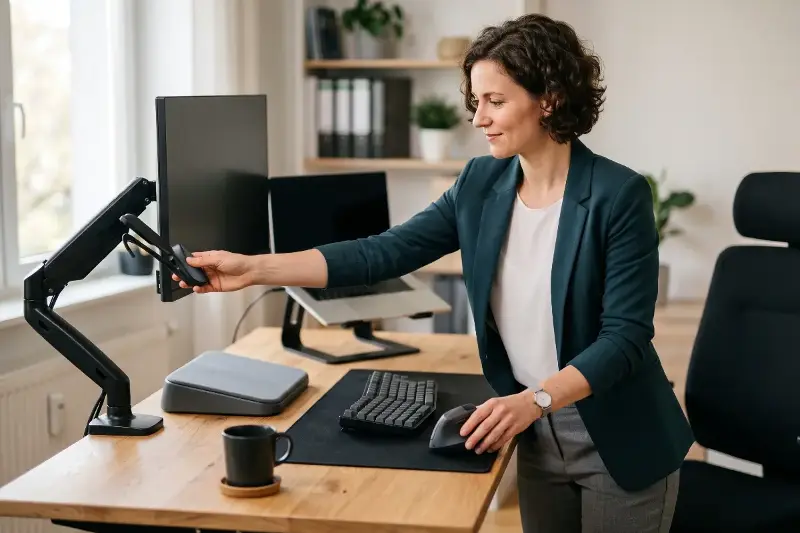
Optimize Screen Distance: Place your monitor about an arm’s length away (20 to 28 inches from your face) with the top of the screen sitting at or slightly below eye level.
-
Angle Your Line of Sight: Looking slightly downward keeps the eyelids partially closed, which slows down tear evaporation.
-
Use Laptop Stands: Combine a separate keyboard with a laptop stand to keep your head and neck in a natural position.
Optimize Text and Screen Brightness
Tiny text forces your eyes to work harder, leading to squinting and fatigue:
-
Increase Font Size: Use clear, comfortably large text so you never need to lean forward to read.
-
Maintain High Contrast: Opt for strong contrast, such as dark lettering on a light background.
-
Match Ambient Light: Adjust screen brightness to match the room. If your display looks like a glowing lamp, lower the brightness; if it appears dull, raise it slightly.
-
Eliminate Glare: Reposition monitors away from direct window light, close blinds, or attach an anti-glare screen filter.
Take Longer Breaks and Adapt Lighting
Short visual pauses are vital, but longer breaks refresh the whole body:
-
Step Away Periodically: Stand up, stretch, grab a glass of water, or step outdoors for ten minutes during lunch. Outdoor light and wide vistas provide a refreshing change from close-up focus.
-
Use Soft Lighting: Avoid working in a pitch-black room with a glowing monitor. Use soft, indirect light, and point desk lamps toward paperwork rather than directly at the screen.
-
Reduce Evening Intensity: Enable night mode or warm color filters in the evening. Dimming screens 30 to 60 minutes before bed supports your body's natural sleep signals.

Support Your Vision with Healthy Daily Habits
Outdated prescription glasses or contact lenses can make computer tasks exhausting. Scheduling regular eye exams ensures your prescription remains accurate for monitor-distance work.
Eye comfort is deeply tied to overall wellness. Stay well-hydrated, aim for quality sleep, and nourish your body with foods rich in lutein, zeaxanthin, omega-3 fats, and vitamins C and E—such as leafy greens, colorful vegetables, eggs, nuts, and seeds. A few thoughtful changes today will keep your eyes feeling energized every day.